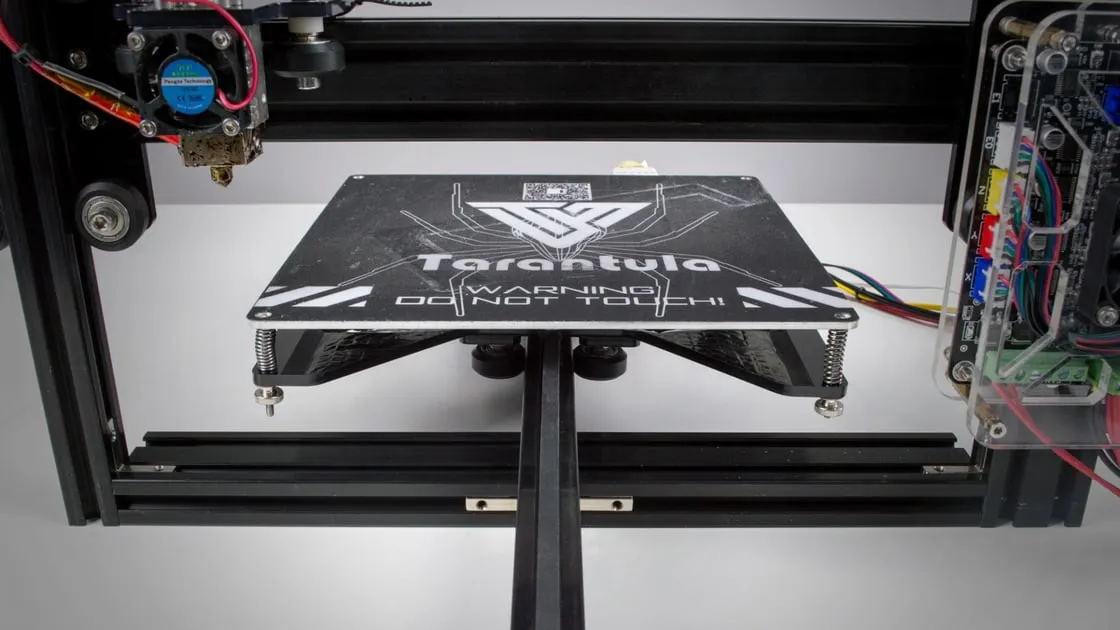
Unboxing Your Tevo Tarantula
Embarking on the journey of 3D printing begins with assembling your Tevo Tarantula. This guide will walk you through each step, from unboxing to your first print, ensuring a smooth and successful assembly. Before you start, find a clean, well-lit workspace to lay out your components. This will prevent losing any essential parts during the assembly process. Taking your time and carefully following instructions is vital. Get ready to build your own 3D printer! Ensure you have ample space to work and prevent static electricity by grounding yourself before handling electronic components. Proper organization will significantly streamline the assembly process, transforming the assembly from a daunting task into an enjoyable learning experience.
Contents Check & Inventory
Upon unboxing, the first step is to verify that all components are present. Use the packing list provided in your Tevo Tarantula assembly manual. This is crucial to ensure you have everything needed for the build. Missing parts can significantly delay the process. Lay out all the components and compare them to the list. Take note of any discrepancies. Don’t proceed until you have everything accounted for or have a plan to acquire missing items. Keep all the small screws and parts separate to prevent confusion during assembly. Careful inventory will prevent frustration and ensures the assembly process will be much easier.
Identifying Components

Familiarize yourself with each component, from the frame pieces and motors to the electronics and small hardware. Identifying each piece correctly is key to following the assembly steps accurately. Sort the various screws, nuts, and bolts into separate containers or labeled bags to facilitate easy access when required. Understanding the function of each part now saves time and prevents mistakes later. Paying close attention to the different types of screws and their intended uses will prove especially helpful. Taking the time to know each of the components will ensure a much smoother assembly.
Tools You’ll Need
Before you begin, gather the necessary tools. Having the right tools at hand will simplify the assembly and improve the overall experience. While the Tevo Tarantula comes with some tools, you might need to supplement them with your own. Make sure you have all the required tools before starting the assembly. This preparation will set you up for success in building your 3D printer.
Required Tools and Supplies
The essential tools include a set of Allen wrenches (metric), a Phillips head screwdriver, pliers, and possibly a small adjustable wrench. Also, have a pair of wire cutters or a hobby knife to trim wires. Having a well-lit work area and possibly a magnifying glass will help you during the assembly. These tools facilitate the precise adjustments and connections necessary for a successful build. Besides the tools, it’s also helpful to have zip ties or cable management clips to organize the wires. The right tools are absolutely crucial for a smooth and successful 3D printer assembly.
Preparing the Frame

The frame is the backbone of your Tevo Tarantula. Correct frame assembly is essential for structural stability and printing accuracy. The frame must be square and robust for the printer to operate properly. Assemble the frame on a flat surface to ensure it is level. Take extra time to secure all connections tightly during assembly. This section focuses on building a solid foundation for your 3D printer.
Assembling the Base Frame
Start by assembling the base frame, typically consisting of aluminum extrusions. Connect these extrusions using the provided screws and corner brackets. Ensure that the frame is square during this process. Use a measuring tool to check the diagonals and ensure the frame is rectangular. Tighten the screws firmly but avoid over-tightening, which could damage the frame. A well-constructed base ensures the rest of the printer components align properly, contributing to successful prints.
Attaching the Vertical Supports
Once the base frame is assembled, attach the vertical supports. These supports provide the structure for the Z-axis movement. Align the vertical supports with the base frame and secure them using screws and brackets. Again, ensure that everything is square and properly aligned before tightening the screws. Proper alignment here will facilitate the smooth movement of the print bed and extruder assembly. Carefully aligning these supports is fundamental to the overall mechanical integrity of the printer.
Securing the Top Frame

Finally, add the top frame to the vertical supports to complete the basic frame structure. The top frame often houses the electronics and sometimes the spool holder. Make sure the top frame is square with the rest of the frame. Tighten all screws to ensure a secure and stable structure. This final step completes the frame, setting the stage for the rest of the assembly. Ensuring the frame is secure and well-aligned is critical for overall stability and print quality.
Installing the X-Axis
The X-axis controls the horizontal movement of the print head. Precision and proper alignment here directly impact the print quality. This is where the hotend moves left and right during printing. Careful attention to detail is required during the assembly of the X-axis components.
Assembling the X-Axis Components
Begin by assembling the X-axis carriage, which holds the hotend and extruder. Attach the components like the hotend carriage, belt holder, and linear bearings according to the manual. Ensure the linear bearings move smoothly along the X-axis rails. The alignment of the X-axis components must be exact to ensure smooth and precise movement. Check that the belt can move freely. Check all screws and make sure the X-axis is square.
Mounting the X-Axis to the Frame

Carefully mount the assembled X-axis onto the frame. Ensure the X-axis runs parallel to the frame and moves smoothly along the rails. Make sure all the fasteners are secure, but do not over-tighten. Attach the X-axis motor and belt, tensioning the belt properly. Proper belt tension and alignment are vital for accurate printing. Check the movement of the X-axis by hand to ensure that it glides smoothly across the frame.
Installing the Y-Axis
The Y-axis moves the print bed back and forth, which is another critical component of the printing process. Proper assembly of this axis ensures smooth bed movement and precise printing. This step involves building a stable platform for the print bed and ensuring it moves smoothly along the Y-axis rails.
Building the Y-Axis Bed Support
Construct the Y-axis bed support, usually consisting of linear bearings, a bed platform, and belt attachments. Ensure the linear bearings move smoothly along the Y-axis rails. Carefully align the platform to the frame. Correct alignment here ensures that the bed will move smoothly and evenly. The goal is to build a sturdy and stable platform that will accommodate the print bed, which helps with print quality.
Attaching the Y-Axis to the Frame

Attach the assembled Y-axis bed support to the frame. Ensure the Y-axis runs perpendicular to the X-axis and moves smoothly. Attach the Y-axis motor and belt, and tension the belt correctly. Check the movement of the Y-axis bed by hand to confirm it moves freely and without any binding. Proper alignment is essential to the printer’s performance, so take your time with this step. Confirm that the bed moves freely across the Y-axis.
Z-Axis Assembly
The Z-axis controls the vertical movement of the print head, which is essential for creating 3D models. Proper Z-axis assembly is crucial for layer adhesion and print height accuracy. This assembly includes the motors, lead screws, and the framework that moves the print head up and down.
Putting Together the Z-Axis Motors and Leadscrews
Install the Z-axis motors and leadscrews. Carefully align the leadscrews with the motor couplings and secure them. Proper alignment here prevents binding and ensures smooth vertical movement. Make sure the leadscrews are straight and the couplings are secure. Ensure the motors are mounted securely. Accurate Z-axis movement is vital for consistent layer heights.
Mounting the Z-Axis to the Frame

Mount the Z-axis assembly to the frame, ensuring that the leadscrews are correctly aligned with the X-axis gantry. Test the Z-axis movement to confirm it moves smoothly along the entire length. Tighten all the screws, but avoid over-tightening. Inspect the movement of the X-axis by raising and lowering the Z-axis. Smooth Z-axis movement is essential for quality prints.
Extruder and Hotend Installation
The extruder and hotend are responsible for melting and extruding the filament. Correct installation of these components is key to a successful print. This part of the assembly directly impacts how well the filament melts and gets deposited onto the print bed. The extruder and hotend assembly should ensure even filament flow for a high-quality final product.
Assembling the Extruder
Assemble the extruder, which pushes the filament into the hotend. Follow the instructions to attach the extruder motor, drive gear, and filament path components. Ensure that the filament path is clear and that the drive gear grips the filament properly. Check to see that the extruder motor runs smoothly, and the drive gear engages the filament. It is critical for consistent extrusion of filament. The extruder must be assembled correctly to ensure reliable filament feeding.
Mounting the Hotend

Attach the hotend to the X-axis carriage. Ensure the hotend is securely mounted and that there are no gaps where filament could leak. Connect the thermistor and heater cartridge wires to the hotend. Secure the hotend in the carriage. The hotend must be mounted correctly to avoid filament leaks. Ensure the thermistor and heater cartridge are functioning properly.
Wiring and Electronics
Wiring and electronics are the brains of your 3D printer, controlling all movements and functions. This step connects the various components and provides power. Take extra care to ensure the connections are correct and secure to prevent malfunctions. Incorrect wiring can cause various issues, so be precise. Careful wiring is critical for the printer’s functionality.
Connecting Stepper Motors
Connect the stepper motors to the control board, paying careful attention to the correct wiring order. Consult the manual to ensure that each motor is connected to the appropriate driver. Make sure the connections are secure and correctly oriented. Correct wiring order is crucial for the printer to move the axes and extruder correctly. Double-check all connections for secure contact.
Connecting Endstops and Sensors
Connect the endstops and any other sensors, such as a bed leveling sensor, to the control board. These sensors help the printer identify the end of travel for each axis and the bed level. Ensure the connections are secure and correctly oriented. The endstops prevent the printer from moving beyond its limits. Make sure all sensors are connected correctly.
Connecting the Power Supply and Control Board
Connect the power supply to the control board, ensuring the correct polarity. Double-check the wiring for safety. Make sure the power supply is set to the correct voltage for your region. Once connected, carefully route and secure all the wires with zip ties or cable management clips. Proper wiring and power supply connections ensure the safety of the printer and proper operation. Before powering on, inspect all wiring for safety.
Bed Leveling and Calibration
Bed leveling and calibration are essential for successful printing. These procedures ensure that the first layer of the print adheres to the bed correctly. Proper calibration ensures accurate prints, so take your time. The first layer of any print is the foundation of the model.
Initial Bed Leveling
Level the print bed, either manually or using an auto-leveling system if your printer has one. For manual leveling, use the leveling screws on the print bed to adjust the height at each corner. Use a piece of paper to check the nozzle height at each corner. Adjust the bed until the nozzle lightly grips the paper. Proper bed leveling ensures that the first layer sticks to the print bed. It is critical for good prints.
Performing Calibration
Calibrate the printer by adjusting settings such as the E-steps (extruder steps per mm) and the Z-offset. These settings ensure that the printer extrudes the correct amount of filament and the nozzle height is accurately set. Follow the calibration instructions in the manual. Fine-tune these settings until the first layer sticks well and the print dimensions are accurate. These calibration adjustments are crucial to producing accurate prints.
First Print and Troubleshooting
Now that your printer is assembled and calibrated, it’s time for your first print. Selecting a test print can evaluate your printer’s functionality and catch any potential issues early. Having a successful first print is an exciting milestone. Addressing any problems immediately helps ensure that the machine is set up correctly. Here are the steps you should take and how to address common problems.
Loading Filament
Load the filament into the extruder. Preheat the hotend to the recommended temperature for your filament type. Manually feed the filament through the extruder and hotend until it starts to extrude. Trim the end of the filament before feeding it. Make sure the filament is loaded correctly. Check the temperature settings for your filament.
Starting Your First Print
Select a test print model. Start the print and monitor the first layer carefully. Watch for any issues with bed adhesion, extrusion, or leveling. Adjust the settings if needed. Make sure the print sticks to the bed. Adjust the bed level if there are problems. The first layer is critical for successful printing.
Troubleshooting Common Issues
If you encounter problems, troubleshoot them systematically. Common issues include bed adhesion problems, nozzle clogs, and print quality defects. Check the bed leveling, nozzle temperature, and filament settings. Consult the troubleshooting section of the manual or online resources for solutions. Fixing issues helps improve your print quality. Solving problems makes sure your printer is working properly. Troubleshooting is a process of identifying and solving problems.